

5 Ways to Keep Your Slate Instance Clean: A Practical Guide for Admissions Teams
Enrollment season is relentless—and your Slate instance absorbs all of it. Every campaign, every event, every inquiry, every portal view. Over time, even the most well-built instances accumulate clutter that slows your team down and muddies your data.
The good news: a little intentional maintenance goes a long way.
At CCA, Slate is our home turf. We’re backed by Noodle Partners, a Slate Preferred Partner, and our team members are Slate Certified. Here are our top five habits that will keep your instance organized, efficient, and working as hard as you do.
Campaigns: Audit Your Drip Campaigns Annually
At the end of every enrollment season, take a hard look at your drip campaigns—both mailings and populations.
For mailings, pull a Deliver analytics report to evaluate performance across each campaign. Low engagement is a clear signal: archive it and rebuild. Every mailing in a drip sequence should serve a specific purpose—moving a student to the next step in the funnel. If it’s not doing that, it doesn’t belong there.
For populations, review your naming conventions. Since a population’s name doubles as the drip campaign name, clarity matters for both your records and communications teams. While you’re in there, set any populations that aren’t in active use to inactive. Less clutter, cleaner navigation.
Deliver: Clean Up Mailing Views
Keeping your Deliver environment neat and tidy is the easiest place to start when cleaning up your Slate instance. Start by looking at your folder structure. We recommend beginning broadly with a master folder for each audience: Undergraduate, Graduate, Transfer. From there, create subfolders by funnel stage: Prospect, Applicant, Admit, Deposit.
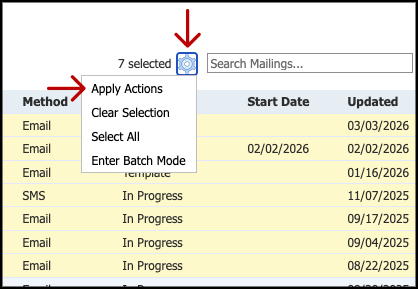
Pro tip: You can batch-move mailings to a folder or subfolder without opening each one. From your full mailing list, select the mailings you want to move, use the cog icon to open Apply Actions, and select your destination folder.
Once your mailings are sorted, audit for anything obsolete and archive it. Archiving doesn’t delete—it removes the mailing from your active view while keeping it accessible for reporting or resending. Use the “Include Archived” toggle in the right-side navigation bar to pull archived mailings when you need them.
Events: Close Out Every Event
Admissions moves fast, and it’s easy to leave a trail of half-closed events behind. Build a habit of fully closing out each event before the next one begins.
That means: every event lives in a folder or subfolder, records are tagged with attendance status, forms are closed, and post-event messages have been sent. At the end of each season, archive completed events entirely. A clean events environment is one where your team can find what they’re looking for without excavating old records.
Records: Address Your Cold Leads
Every institution has them—inquiries that went cold and never made it out of the inquiry pool. That’s a normal part of the funnel. What matters is what you do with them.
Set aside time at the end of your admissions season (the final month works well) to build a report on leads still sitting in your inquiry pool. Then make a decision: re-engage or remove.
If you re-engage, keep it focused. A short, targeted campaign—two or three touchpoints—that checks whether a prospect is still interested and gives them a clear path to opt out. If you’re done with the cycle, drain the pool. Remove cold leads from your inquiry pool, start fresh, and let your data reflect reality.
Portals: Review Your Portals on a Regular Cadence
Slate Portals are one of the most powerful tools in your enrollment stack—and one of the most maintenance-prone. Schedule a quarterly review, both from the Slate build side and as a record.
When reviewing the build side, ensure that views have descriptive names; portals can have multiple views, so knowing which view is which by name alone is imperative. Look at each View and be sure the content blocks are named correctly and are descriptive enough for a new team member to follow the intended audience. Review any hidden blocks and determine if they are worth keeping within the Portal build.
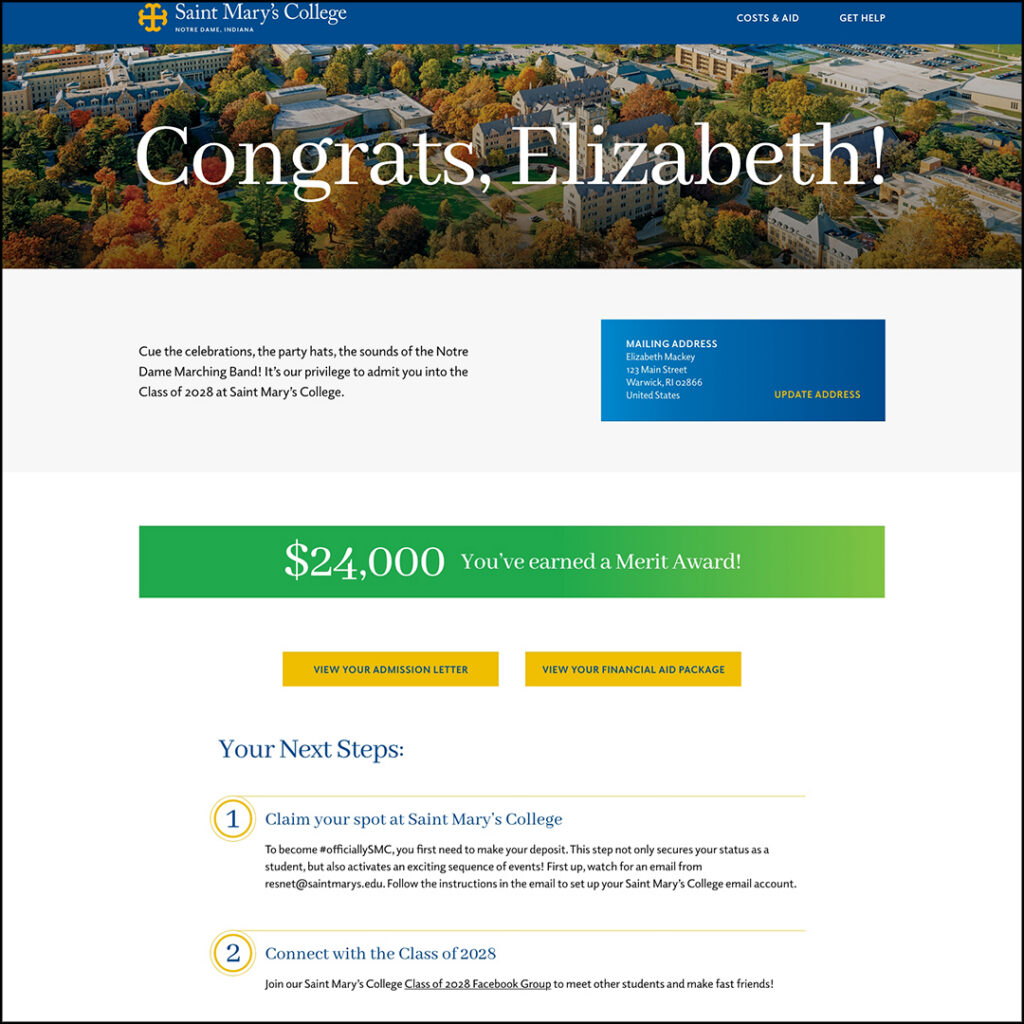
On the record side: QA dynamic content, check that links aren’t broken, and confirm that styling renders correctly. Then take a step back and look at the portal the way a student would. Is the information organized logically? Would a first-time visitor know where to go? Would the navigation make sense without a guide?
A portal that’s clean, current, and easy to follow does real work. One that isn’t will undermine your team’s credibility with every student who logs in.
Need More Help?
These five areas won’t solve every Slate challenge, but staying on top of them consistently keeps your instance from becoming a liability. If your team needs a second set of eyes on any of it, CCA has deep experience building and auditing Drip Campaigns, designing Portals, cleaning up inquiry pools, and building the reports that surface what’s actually going on in your data. We’re here when you need us.